Zoom Out 3D
- 4.4
- Rating
- 10.00M
- Installs
- Free
- Price

 Analysis by App-foxy
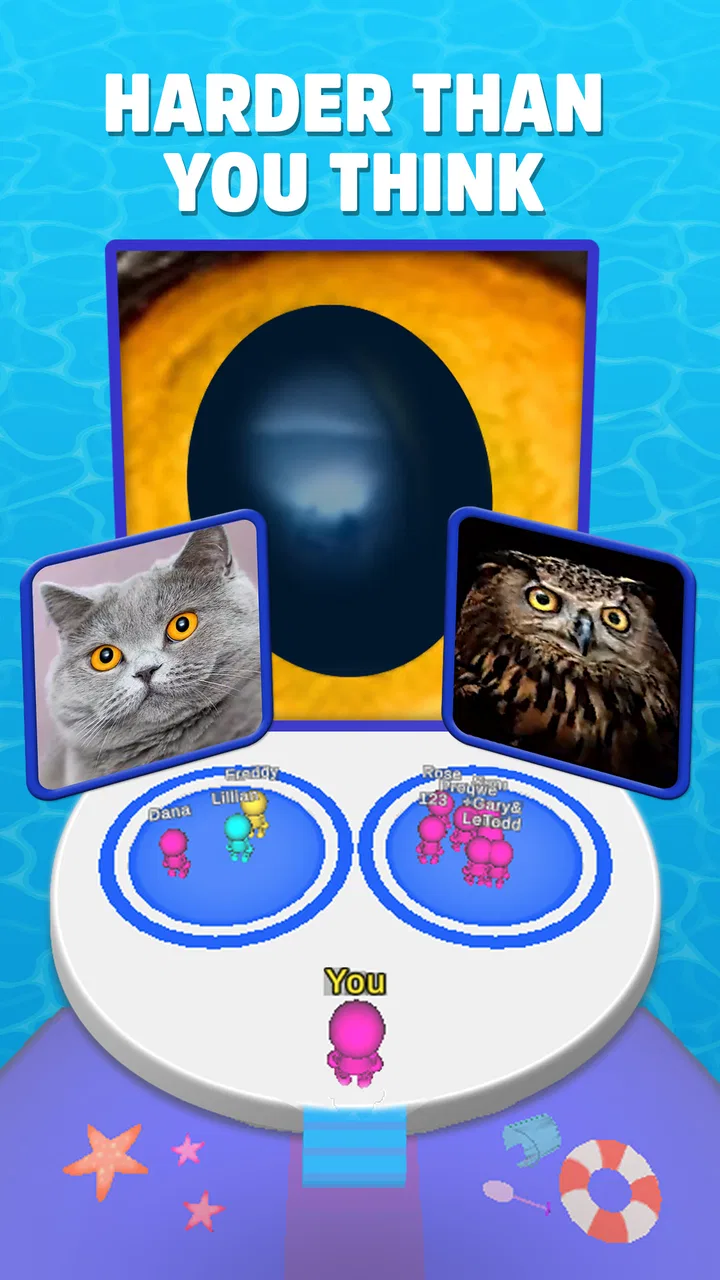
I tried Zoom Out 3D expecting a quick celebrity quiz, and that is exactly where its appeal lies: it turns recognition into a visual challenge rather than asking me to answer a long list of ordinary trivia questions. The central idea is simple. I see an image that is deliberately difficult to identify, then work toward the celebrity hidden inside it by changing how closely I view the picture. That single mechanic gives the game a more hands-on feeling than a standard multiple-choice quiz.
It is a free trivia game from Coco Play By TabTale, aimed at players aged 10 and over. The game has reached over ten million installs and holds a 4.4 average from around fifty-three thousand ratings, which suggests that its quick visual format has found a sizeable audience. After spending time with it, I can see why: each round is easy to understand, starts quickly, and works well when I only have a few spare minutes.
Why the zooming challenge makes this quiz different
The strongest part of the game is not simply guessing celebrities. It is the way the picture controls the difficulty. A familiar face can become surprisingly hard to recognize when the view is too close, while a small adjustment may reveal a hairstyle, facial outline, costume detail, or other clue. I found myself switching between instinct and observation: first making a guess from a vague visual impression, then looking for the detail that actually supports it.
You May Also Like

 AccuWeather: Weather Radar
AccuWeather Review: A Quick, Clear Forecast for Everyday Decisions
For everyday plans, the best forecast is the one you can understand quickly. AccuWeather makes rain timing, radar, and local conditions easy to act on, with a few trade-offs.

 Hill Climb Racing
Why Hill Climb Racing Still Turns Crashes Into One More Run
A tiny car, a bumpy hill and one more upgrade: Hill Climb Racing keeps resurfacing because its simple chaos makes every near-miss feel personal.

 AliExpress - Shopping App
AliExpress Makes Global Shopping Feel Personal, but Shoppers Bear the Risk
AliExpress turns a global marketplace into a pocket-sized discovery engine. Its reach is useful, its shopping loop compelling, and its trade-offs easy to miss.

 Lords Mobile: Kingdom Wars
Lords Mobile Is a Kingdom-Building Routine, Not a Quick Match
A case-by-case verdict on the building, battles, device demands, and social commitments that make Lords Mobile rewarding for some players and exhausting for others.

 PDF Scanner app - TapScanner
TapScanner Makes Paperwork Easier to Capture, Check, and Share
TapScanner makes scanning with a phone feel less like a rescue operation and more like a dependable step in getting work done. Its capture tools are useful, though not flawless.

 Block Blast!
 Shows How Much a Puzzle Game Can Leave Out
A quiet grid game shows why puzzle players increasingly value instant clarity, repeatable skill and low-pressure play—and where the genre still needs to catch up.
More From Our News Desk
View All News


That makes the game feel more active than a conventional trivia app. In a typical quiz, the question is already written clearly and the challenge is recalling information. Here, the first challenge is interpreting the image. The game tests recognition, but it also rewards patience. Guessing immediately can work when the picture contains an obvious clue, yet waiting for a more useful view is often the better approach.
The important capability is controlled visual discovery: the game asks me to turn an unclear image into a recognizable celebrity instead of handing me the answer through a sentence. That change has a real effect on the pace. I am not just reading and tapping; I am examining, forming a hypothesis, and checking whether the image supports it.
This also gives the game a different mood from celebrity name quizzes. A text-based alternative may be better for testing film knowledge, music history, or facts about public figures. Zoom Out 3D is more casual and visual. It suits players who enjoy the moment when a confusing picture suddenly makes sense, even if they are not especially interested in detailed celebrity facts.
How the visual guessing works during a round
In practice, I approach each image in stages. I begin by asking what kind of clue I can see rather than trying to force a name too early. Is the visible shape likely to be a face, hair, clothing, or a recognizable pose? Once I have a possible direction, I use the changing view to test it. If the emerging details do not match my first thought, I move on instead of becoming attached to a weak guess.
This method is more useful than tapping random answers. A wrong first impression can be caused by a familiar feature that belongs to several celebrities, while a later view may provide the distinguishing detail. I also found that the game feels fairer when I treat every stage as evidence. The best guesses are not always the fastest ones; they are the ones that survive another look at the image.
For younger players, this makes the game approachable because the basic objective is immediately understandable. There is no need to learn a complicated ruleset before starting. For adults, the attraction is the small mental puzzle inside each round. I can play casually, but I can also turn a difficult image into a short exercise in visual reasoning.
The format is especially convenient when I do not want a long session. I can open it while waiting for a friend, during a short break, or at the end of the day when I want something lighter than a full game. The rounds are built around a single recognition task, so I do not need to remember a story, manage a team, or prepare for a lengthy challenge before I can enjoy it.
What I would do when a picture seems impossible
My most useful habit was to stop treating the first visible shape as the whole clue. A close view can exaggerate one feature and hide the overall identity. Instead, I look for combinations: a face shape together with hair, or a clothing detail together with posture. One clue can mislead me, but two matching clues usually make a guess much stronger.
I also recommend separating recognition from confidence. I may recognize a general style without knowing the person, and that is fine. The next view can confirm whether the initial impression is useful. This keeps the game from becoming frustrating when the image is deliberately ambiguous at the start.
Another practical tip is to avoid rushing through familiar-looking rounds. The easiest images are often the ones where I am most likely to answer from a vague resemblance. Taking an extra moment helps distinguish genuine recognition from a name that merely comes to mind first. That small pause makes the experience feel less random and improves the satisfaction of a correct answer.
Where the game fits best in everyday play
The best scenario for me is a short social break. If I am sitting with another person, we can look at the same image and argue over the likely celebrity before settling on an answer. The visual format makes it easier to share than a private knowledge quiz because everyone can inspect the clue and explain what they see. It can work as a relaxed conversation starter without requiring anyone to be an expert.
It is also a good choice for a player who likes quick mental resets. After a busy stretch of work or study, I may not want a demanding strategy game. A visual guessing round gives me something to focus on for a moment, then I can put it down. The straightforward structure is useful here because the game does not ask me to invest in a complex progression system before the main challenge becomes enjoyable.
Families should find the age guidance helpful when deciding whether it suits a child. The game is marked Everyone 10+, so I would still consider the individual player’s interest in celebrity imagery and trivia. A child who enjoys visual puzzles may like it, while someone who prefers building, racing, or story-driven play may lose interest quickly. The age label is not a promise that every ten-year-old will enjoy the same content or difficulty.
For a group, I would use it as a turn-taking activity rather than as a serious competition. One person can describe the clue without saying the suspected name, while the others make their guesses. This makes the visual mechanic more entertaining and reduces the pressure of getting every answer right. It also shows one of the game’s strengths: the core challenge is simple enough to explain aloud.
On the other hand, this is not the best pick when I want deep trivia. The game’s focus is identifying the celebrity in the image, not learning a biography or comparing detailed facts. If my goal is to improve general knowledge, a broader quiz with categories and explanations would be more useful. If I want a competitive multiplayer experience, I would also look elsewhere rather than expecting this short visual format to provide a full tournament atmosphere.
How it compares with familiar trivia alternatives
Compared with ordinary multiple-choice trivia, Zoom Out 3D gives me less written context and more visual interpretation. That makes it easier to start but also narrower in subject matter. A traditional quiz can ask about history, science, geography, or entertainment, while this game keeps its identity challenge centered on celebrities. The trade-off is clear: it is more focused and immediately playful, but less educational in a broad sense.
Compared with a crossword-style celebrity puzzle, it avoids the effort of spelling and filling a grid. I do not have to manage intersecting answers or remember a long clue. Instead, I respond to an image. That makes the experience more accessible for quick play, although players who enjoy wordplay may find the visual approach less satisfying.
Compared with a photo-recognition game that simply shows a clear portrait, this title gets more mileage from uncertainty. The image does not necessarily give away the answer at first glance, so the reveal becomes part of the entertainment. The downside is that players who dislike ambiguity may see the same design as friction. Whether that feels clever or annoying depends largely on how much I enjoy making guesses from incomplete information.
The game’s current version is 1.0.1.1, and it runs on Android 7.0 or later. That makes it relevant for people using older compatible Android devices, though I would still check that my phone meets the requirement before trying to install it. Since it is free, the initial decision is easy: I can test the visual mechanic without paying upfront and decide from actual play whether the format holds my attention.
Where the experience may lose momentum
The same focused mechanic that makes the game distinctive can also limit its longevity. Once I understand how the visual guessing works, the novelty depends heavily on whether the images continue to feel varied and satisfying. Players who need constant new systems, strategic depth, or a strong sense of progression may find the rounds repetitive sooner than players who enjoy short recognition challenges.
There is also a natural fairness issue with celebrity quizzes. If I do not know the person being shown, better observation cannot always compensate for a gap in familiarity. The game can test visual recognition, but it still depends on the player having some awareness of public figures. That means the difficulty may feel inconsistent between players, especially in a mixed-age group or between people with different entertainment interests.
Another limitation is that visual clues can be interpreted differently. I may notice a feature and connect it to the wrong person, while another player sees the intended clue immediately. That uncertainty is part of the fun when I am in the mood for it, but it can become tiring if I want clean questions with unambiguous answers. I would not choose this as my only trivia game; I see it as a specialized, casual option.
Because the game is free, I would approach it as something to sample rather than a guaranteed long-term hobby. The absence of an upfront cost makes that reasonable, but free games can still consume attention through repeated short sessions. My advice is to decide after a handful of rounds whether the reveal itself remains enjoyable. If I am only tapping through because I feel compelled to finish, the format is probably not a good match.
Who gets the most from this visual celebrity quiz
The ideal player is someone who enjoys guessing from partial information and likes the small satisfaction of a picture becoming clear. Casual players gain the most because the game is easy to pick up, works in short sessions, and does not demand knowledge of complicated rules. It is also a good fit for friends or family members who want a shared guessing activity without setting aside time for a full board game.
Players who enjoy celebrity culture may have an advantage, but I do not think expert knowledge is required to appreciate the mechanic. The visual clues create a second route to an answer, so recognition is not based entirely on remembering names from written descriptions. Still, someone who has little interest in celebrities may find the subject matter too narrow even if the image challenge itself is enjoyable.
I would skip it if my priority is a comprehensive trivia workout, a narrative game, or a highly strategic experience. It is also not the right choice for someone who becomes frustrated by uncertain clues or wants every question to provide a clear factual explanation after answering. A general knowledge quiz will serve those needs better, while a puzzle game may offer more depth for players who want increasingly complex challenges.
For a first session, I suggest playing without trying to maximize speed. Look at the broad shape, identify a likely clue, and change your view only when you have a reason to do so. That approach makes the central capability more rewarding and helps reveal whether the game’s style suits you. If the pleasure comes from the reveal, you will probably enjoy returning to it; if you only care about getting names right, the experience may feel thin.
Coco Play By TabTale has kept the concept direct, and I think that is both its strength and its boundary. The game does not need a complicated pitch because the visual guessing loop explains itself. Its 4.4 average and broad install reach reflect a format that is easy for many people to try, but popularity does not remove the personal question of whether celebrity recognition is your kind of trivia.
My final view is positive but specific: this is a pleasant free visual quiz for short breaks, informal group play, and anyone who enjoys turning an unclear image into a confident answer. The zoom-based reveal gives it a personality that ordinary celebrity questionnaires lack. I would recommend it to a friend who wants something light and visual, while steering a serious trivia fan toward a broader quiz. Choose it for the discovery moment, not for deep trivia or long-form game depth, and its strengths are much easier to appreciate.
FAQs for Zoom Out 3D
01What is Zoom Out 3D?
Zoom Out 3D is a unique puzzle game available for Android and iOS devices. The game challenges players to solve puzzles by zooming in and out on different scenes to find hidden objects or clues. With its engaging gameplay and vibrant graphics, it offers a fresh twist on traditional puzzle games.
02How does the gameplay of Zoom Out 3D work?
In Zoom Out 3D, players navigate through various levels by zooming in and out of scenes to uncover hidden items or solve puzzles. Each level presents a distinct challenge requiring players to think creatively and use their observational skills. The intuitive touch controls make it easy to adjust the zoom level and interact with the scene.
03Is Zoom Out 3D suitable for all ages?
Yes, Zoom Out 3D is designed to be family-friendly and suitable for players of all ages. The game does not contain any inappropriate content and focuses on enhancing problem-solving and critical thinking skills, making it an ideal choice for both children and adults looking for a fun and challenging experience.
04Are there any in-app purchases in Zoom Out 3D?
While Zoom Out 3D is free to download and play, it does offer optional in-app purchases. These purchases typically include hints or skips for difficult levels, as well as cosmetic upgrades. Players can enjoy the entire game without spending money, but these purchases can enhance the gaming experience.
05What are the system requirements for Zoom Out 3D?
Zoom Out 3D requires a device running Android 5.0 or later, or iOS 10.0 or later. The game is optimized for both smartphones and tablets, ensuring smooth performance on a wide range of devices. For the best experience, it is recommended to have a stable internet connection and sufficient storage space.
Pros
- Engaging puzzles with increasing difficulty.
- Intuitive controls for smooth gameplay.
- Visually appealing graphics and themes.
- Frequent updates with new levels.
- Suitable for all ages; fun for everyone.
Cons
- Contains ads that can interrupt gameplay.
- Limited hints; may require in-app purchases.
- Some levels might feel repetitive.
- No offline mode available for play.
- Requires a stable internet connection.

Zoom Out 3D
Gallery